Article
Apr 17, 2026
Our Local AI Cloud: How We Brought ComfyUI to the Render Farm
How we turned AI workflows into infrastructure — using our existing GPU farm, fully on-premise
At our studio, we work on projects where every frame matters — and increasingly, so does every minute of an artist’s time.
Over the past year, generative AI tools have moved from novelty to real production utility. Chief among them is ComfyUI: a powerful, node-based framework for workflows ranging from image generation and video upscaling to depth estimation and rotoscoping. We have been experimenting with integrating some of these workflows into our VFX pipelines, especially the ones that automate or speed up the mundane, repetitive tasks inherent in digital production.
We realized that these AI-powered workflows can no longer be treated as just tools — they should become part of the infrastructure.
The Problem with GenAI on the Desktop
ComfyUI was designed to run on a single machine. When an artist launches a workflow, their GPU is fully occupied until the job completes. For quick tests and during R&D for custom workflow development, that’s fine. For frequently used workflows, high-resolution video processing and production-scale workloads, it becomes a bottleneck. Workstations get locked. Artists wait. Productivity drops.
The obvious answer is the excellent Comfy Cloud — but for our studio it is not feasible because:
We already have strong hardware infrastructure on premise - incremental cloud costs are hard to justify when you have idle GPU capacity
Client data leaves your local infrastructure when you use cloud solutions
For our VFX studio, the second point isn’t optional. It’s a contractual and ethical boundary to keep data and client footage local. So cloud wasn’t an option for us.
The Insight: AI Jobs Are Render Jobs
We already had a system designed to handle distributed compute: Our Render Farm.
It queues jobs, distributes them across GPU nodes, monitors execution, and scales across machines. We use CGRU/Afanasy — a system proven in production over years.
The insight was simple: A ComfyUI workflow is a compute task.
It takes inputs, runs on a GPU, and produces outputs. That’s exactly what a render farm does. So we built a framework to bridge the two, inspired by Philipp Doll's blogpost on hosting ComfyUI workflows via API
From Render Farm to Local AI Cloud
We turned our render farm into what we call a Local AI Cloud.
A system where:
AI workflows are submitted like render jobs
GPUs across machines execute them in parallel
Data never leaves the local network
Artists don’t wait on local hardware
How It Works
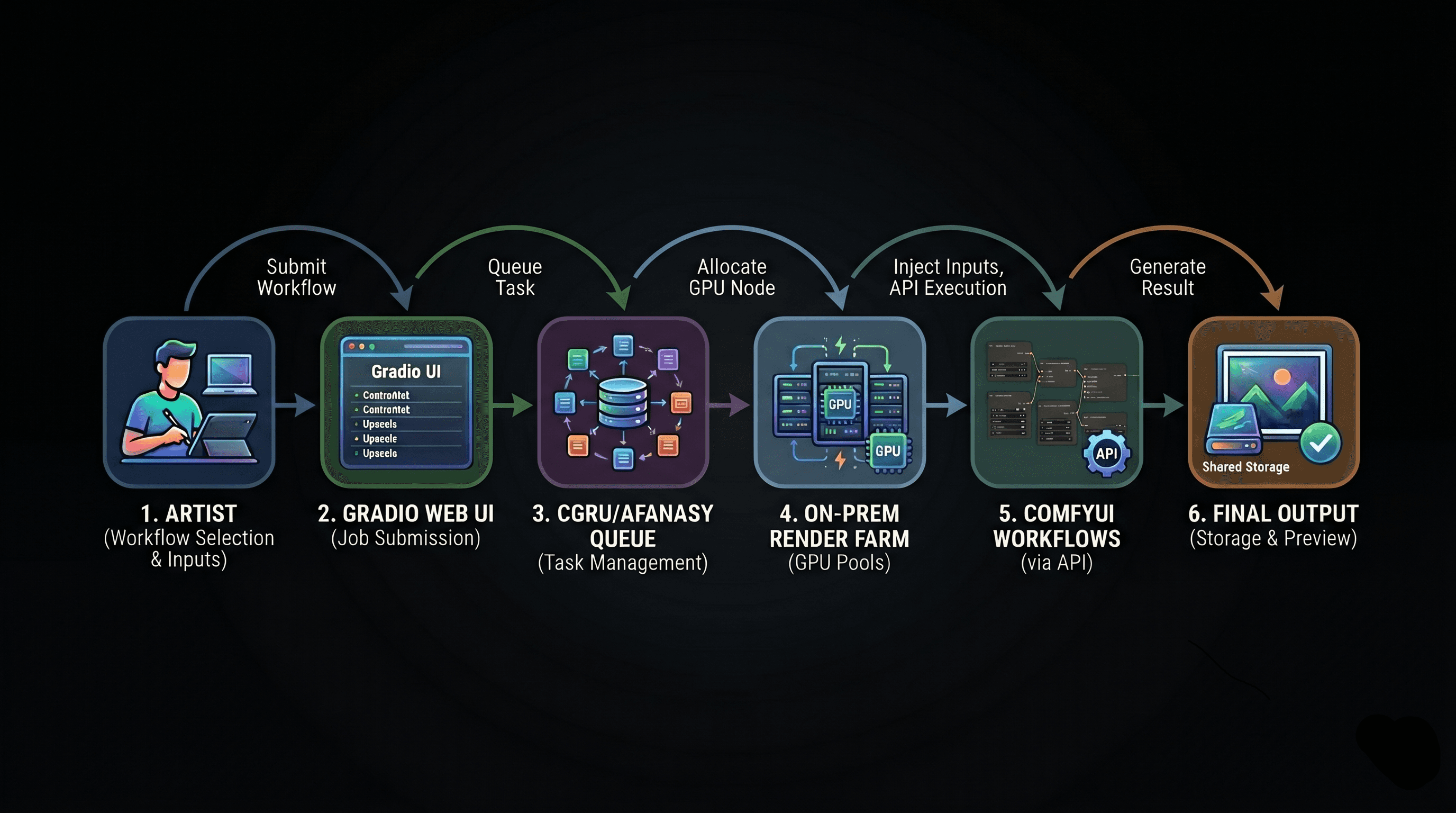
The system is built as a layered pipeline — simple on the surface, powerful underneath.
Artist Interface
Artists access a Gradio based browser application listing the menu of available AI workflows.
They select a workflow, provide inputs (footage, prompts, parameters), and submit.
No JSON. No command line. No friction.
Job Submission & Isolation
Each submission creates an isolated job environment with its own inputs and outputs.
This ensures:
No file conflicts
Clean tracking of all jobs
Full auditability
Multiple jobs can run concurrently across the team without interference.
Render Farm Execution
The job is picked up by CGRU/Afanasy and assigned to an available GPU node.
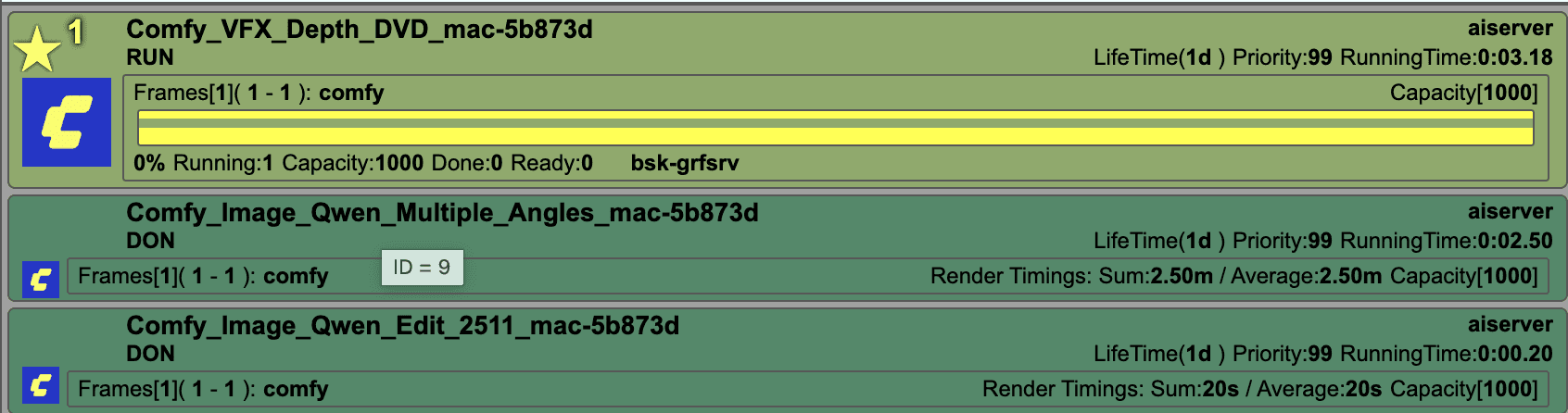
Each node:
Loads a parametrized ComfyUI workflow
Injects the artist’s inputs
Executes via the ComfyUI API
We maintain separate GPU pools for different workload types, optimizing VRAM usage and throughput.
Monitoring & Output
Artists see live progress through the web interface.
Once complete:
Outputs are written to shared storage
Results are instantly previewable and downloadable in-browser
Submit → move on → review when ready.
What This Unlocks
This system changes how AI fits into production.
Workstations stay free — artists no longer wait on local GPUs
Data never leaves — everything runs fully on-premise
No per-job cost — we use existing hardware capacity
Parallel execution at scale — multiple jobs run simultaneously
Shared workflows — one artist’s solution becomes everyone’s tool
A Living Workflow System
This isn’t a static toolset. It’s an ever- growing workflows repository.
When an artist builds a strong workflow — tests it, refines it, proves it in production — it can be promoted into the shared library.
The framework is the infrastructure.
The artists are the ones expanding it.
This turns AI from individual experimentation into collective capability.
Why This Matters
We believe:
AI should run where your data already lives
Infrastructure should adapt to workflows — not the other way around
Studios should own their compute, not rent it per request
This is why we built our Local AI Cloud as a foundation.
What’s Next
The system is already in active use, with workflows across:
Image / Video generation with ControlNets
Style & Performance Transfer
Depth and Normal estimation
Rotoscoping and Matting
Upscaling and Denoising
Pipeline utilities (including EXR processing with full color science support)
More workflows are being added. The system improves as it’s used.
We've essentially built a private AI Cloud — one that runs on our hardware, respects our security requirements, and gets better the more the team uses it.
If you're building something similar or exploring this direction, we’re always open to sharing what we’ve learned.